
share WordPress Plugins
Sharinger – Share Buttons for Elementor

The Sharinger is a simple and lightweight WordPress plugin for Elementor adding Share Buttons. It lets you place unlimited social buttons anywhere on your pages. The plugin supports all popular networks: Facebook, Twitter, LinkedIn, Reddit, Tumblr, Digg, Skype, StumbleUpon, Telegram, Pocket, XING, WhatsApp, Email, and Print. Share your top posts to get even more people
OpenGraphiq – WordPress Social Image generator

OpenGraphiq allows you to automatically generate social share images for your WordPress content – posts, products and other post-types. It works with every public post-type in WordPress! Now you can automate your creative and social network management process and save time on routine content production so you can focus on more significant tasks. Use OpenGraphiq
SocialBox – Social Sidebar WordPress Plugin

SocialBox is a responsive jQuery social follow/share sidebar navigation WordPress Plugin. You can add social sidebar to your WordPress site easily. You can add all icons as follow. But, you can add following share types: Twitter, Facebook, LinkedIn, Pinterest, VK, Flipboard, Buffer, WhatsApp, Telegram, Reddit, Tumblr, Blogger, Amazon, Yahoo, Evernote and Email. Features Included: Fully
TMfeed – WordPress Embeddable Post Widgets For Elementor
Get more traffic to your website with TMfeed embeddable post widgets plugin. Rich set of widget customization options allow you to customize look and feel of your forms easily. With TMfeed, your site visitors will able to add your posts to their website with a piece of iframe code. Widgets can customized by the users
Easy Select and Share Pro
Easy Select and Share Pro WordPress Plugin –—–—–—–—–—–—–—–—– Don’t make your visitors bore by sharing just static text. Grow Your Audience by giving freedom to your visitors to share any content from your site. Easy Select and share pro plugin allows users to select text from your content and share on popular social medias. Plugin
Mediagram Gallery for WordPress
Convert your WordPress galleries to a whole new Mediagram Galleries and let your users react and share them! Mediagram Gallery is a standalone WordPress gallery plugin, which lets you add any number of images to the gallery and display them in Grid and Masonry layout as per your requirements. The main reason behind building this
WooCommerce Share for Discount
LIVE DEMO: https://biagior2.sg-host.com/prodotto/t-shirt/ This plugin allows customers to receive a discount via social sharing. By this, you strengthen customer loyalty and the positive image of your website. You can create your discount directly through WooCommerce in the coupon menu that offers many possible options to customize the discount. You can put the button anywhere you
WP Tweet Selection | Twitter Highlighter
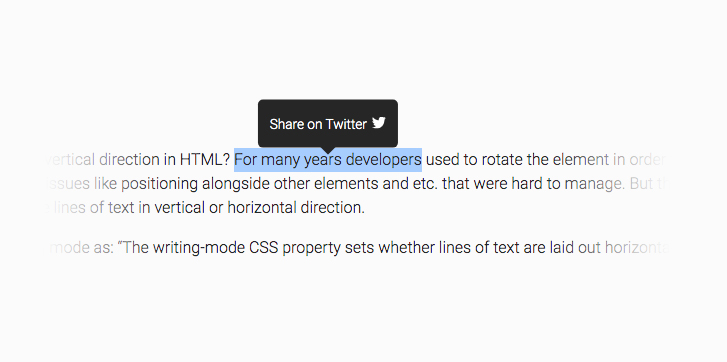
WP Tweet Selection | Twitter Highlighter allows you to share selected texts on your website to Twitter social media. Whenever someone selects some text on your website, a tooltip appears that suggest sharing on Twitter. The plugin is very lightweight (~16 KB) and compatible with the latest version of WordPress. It is customizable so you


Trioceros – Community Add-on For Palleon WordPress Image Editor
Important: Trioceros requires Palleon to be installed. Buy Palleon Now! Create Your Palleon Community With Trioceros Let your users get social in Palleon Image Editor and share their images and templates with the community. Activities Users can add new activities using the “Add New” form. You can select which user roles are allowed to