
form submissions WordPress Plugins
Google Sheets Connector for WPForms – Sync Form Entries to Spreadsheets

Stop Copying Form Data. Let It Flow Straight to Google Sheets. Google Sheets Connector for WPForms syncs every form submission to Google Sheets—automatically. No manual export, no copy-paste. Connect once, and entries land in your spreadsheet as new rows. Perfect for leads, surveys, registrations, and any form where you need data in a sheet. Two

Contact Form 7 Views Pro -Drag & Drop Form Submissions View builder for Contact Form 7

Contact Form 7 Views lets you to show Contact Form 7 submissions in frontend using drag & drop View builder. You need Flamingo plugin installed to be able to use this plugin. You can create table & list view. It allows you add add content before & after the View. You can set number of
Contact Form 7 Views Pro
Contact Form 7 Views lets you to show Contact Form 7 submissions in frontend using drag & drop View builder. You need Flamingo plugin installed to be able to use this plugin. You can create table view (list view coming soon). It allows you add add content before & after the View. You can set
Ninja Forms Public View
What is Ninja Public View? The Public View add-on for NINJA FORMS is a great way to show form submissions to your website visitors. Ninja Forms is one of the leading forms plugin available on WordPress.org, our Public View add-on works seamlessly with it. You can use it to show various data collected via your
Wemblo Forms – Create Unlimited Forms
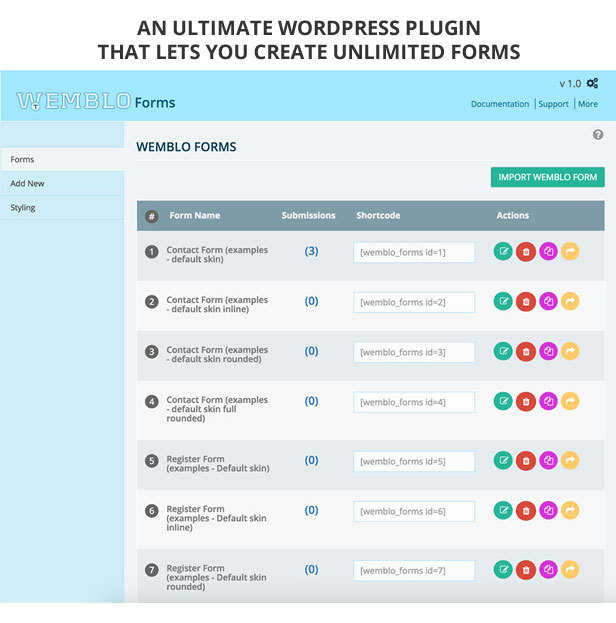
WEMBLO Forms is a wordpress plugin that lets you create unlimited forms with just few easy clicks. An average form can be created and deployed with all required settings within 3 minutes. It has 29 skins that can be applied to any form by just single click, further customize any form according to your taste


WPCool – Notifications from CF7, WooCommerce to Telegram, Discord
WPCool Notifications is a professional WordPress plugin designed to keep you informed about crucial events on your website in real-time. By sending instant notifications to Telegram and Discord, you’ll never miss important updates, enhancing your site’s security and user engagement. Key Features Multiple Messenger Support Telegram Notifications: Receive immediate alerts directly on Telegram. Discord Notifications: